Siri got a new look with iOS 14, and now it's getting new voices in iOS 14.5.
John Kim/CNETThe overall sound of Apple's digital assistant, Siri, has more or less remained the same since it made its debut alongside the iPhone 4S nearly a decade ago. (Hard to believe it was that long ago, isn't it?) But that changed earlier this year when Apple released iOS 14.5 and iPadOS 14.5, adding two new voices and no longer setting the default option to a female voice when you set up a new Apple device.
All four voices sound amazing, adding more personality to your interactions with the virtual person living inside your iPhone, iPad or Apple Watch. More importantly, they're a welcome break from the standard Siri voice, variety being the spice of life.
Making the switch is easy, you just have to know where to look. Better yet? After you go through the new options and make your selection, that voice will sync to all of your Apple devices automatically. Here's how you can get a new Siri in a couple of minutes.
Ready for a new-sounding Siri?
Screenshots by Jason Cipriani/CNETWhere to find Siri's new voices for iPhone and iPad
According to Apple, the first time you set up a new device you'll be asked which voice you want Siri to use. It's the first time Apple hasn't made a female voice the default for its digital assistant. If you're like me and don't plan on getting a new iPhone anytime soon, but you do want to change Siri's voice after installing iOS 14.5, here's where you can find the option.
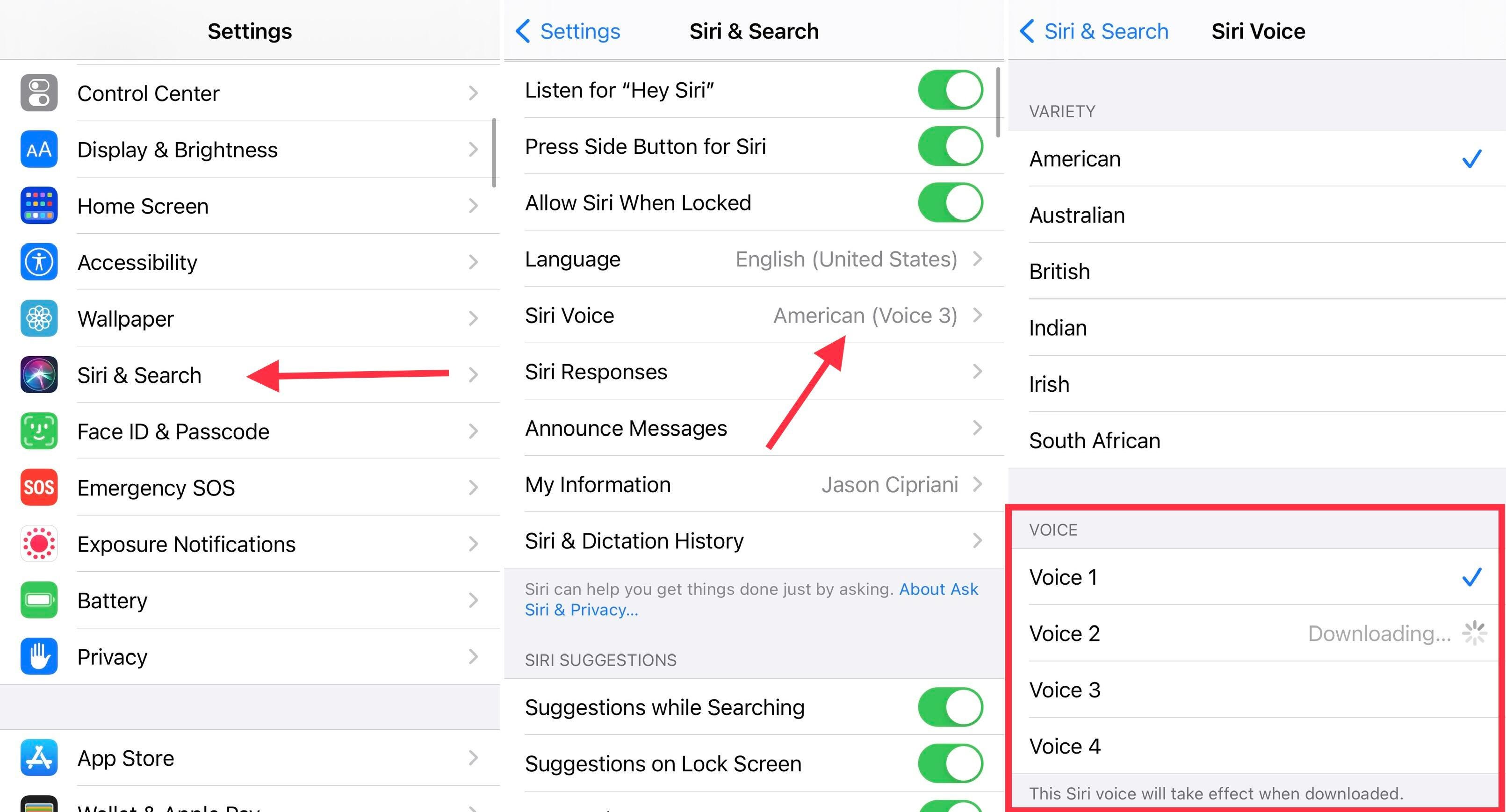
Open the Settings app, then go to Siri & Search > Siri Voice. Under the Voice section you'll find four different options. Voice 2 and Voice 3 are new, but to my ear all four sound more natural and realistic. Don't you think?
Tap each voice to hear a preview. Switching to a new voice will require your iPhone or iPad to download the necessary files to make the swap. You'll see Downloading… with a loading animation on each voice as you select it. Once the download is complete, your device will start using that voice going forward.
My pick out of the new bunch is Voice 3. It's a fun change from the standard female Siri voice I've used all these years. To my surprise, my selection synced to the rest of my Apple devices, like my Apple Watch and iPad Pro, as well. The change didn't make its way to my HomePod, however. Not sure what I need to do to get the proper voice there.
The new voices are currently available in English, but I have to think Apple is working on adding more languages. Apple didn't mention anything about more languages in iOS 15, which is currently available to developers as a beta. It will officially launch later this year, but in the meantime, make sure you soak in as much information about iOS 14 as possible. We have plenty of tips and tricks and hidden features for you to check out.
"sound" - Google News
June 21, 2021 at 06:15PM
https://ift.tt/2TQKa0e
Siri's new voices sound amazing. Here's where to find them and how to make the switch - CNET
"sound" - Google News
https://ift.tt/2MmdHZm
Shoes Man Tutorial
Pos News Update
Meme Update
Korean Entertainment News
Japan News Update


No comments:
Post a Comment